
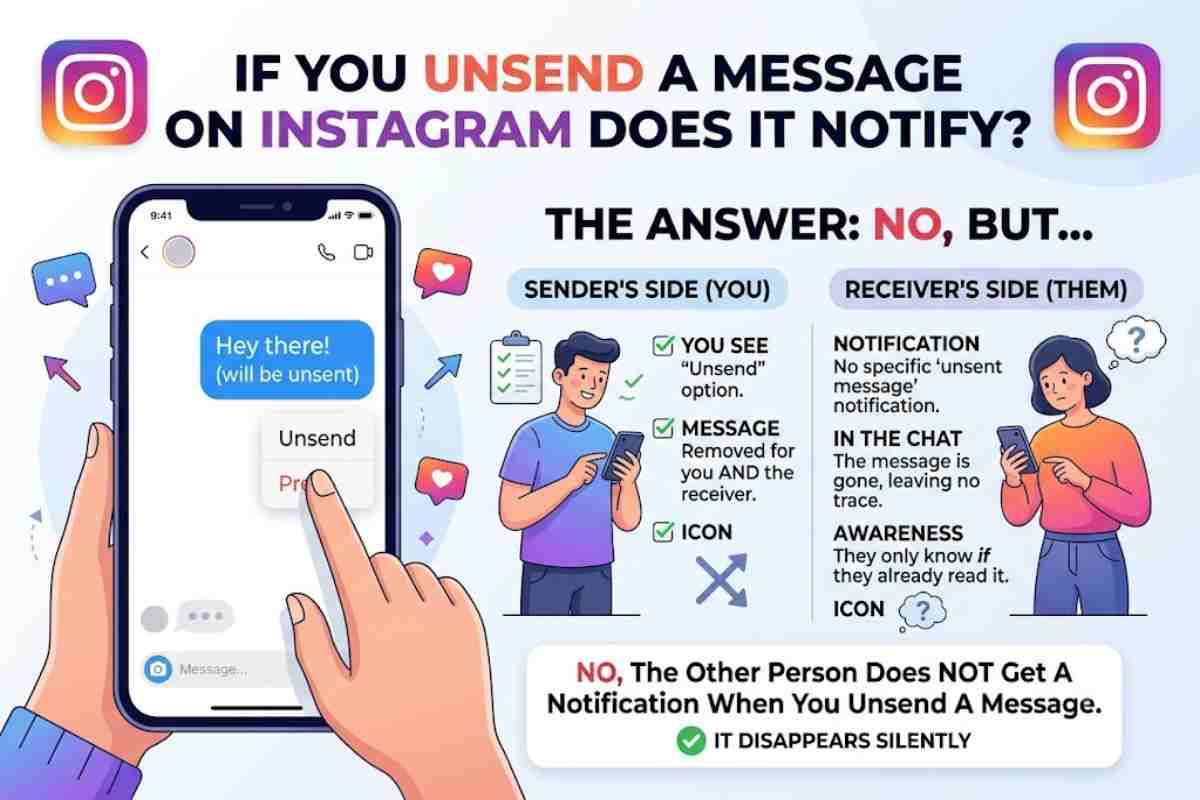
If you unsend a message on Instagram does it notify the recipient? Generally, Instagram does not send a dedicated notification saying that you unsent a message. The message is removed from the chat, although the recipient may have already seen the message, a notification preview, or the conversation before you removed it.
Clicked ‘Send’ but it was to the wrong DM, or have you changed your mind, or even better, you saw a typo? You might automatically wonder, “does anyone get an alert if you unsend a message on Instagram”? The answer in short, and usually, no. Instagram’s Help Centre confirms that your unsent message is no longer available to chat recipients, however cautions that it may have already been seen.
That distinction matters. Unsend removes the message from the conversation; it cannot undo something another person has already read or captured.
Does Instagram Notify Someone When You Unsend a Message?
At the moment, under Instagram’s current defined behavior, there’s no common system alert given to the recipient, saying that you deleted a message. The message is deleted from the conversation.
However, online user reports from August 2026 indicate that some people may be seeing unusual push-notification behavior around unsent messages. This suggests that notification behavior can potentially vary by app version, account or experiment.
| Situation | What can happen? |
|---|---|
| You unsend the message | Message is removed from the chat |
| Instagram sends a dedicated unsend alert | Generally no |
| Recipient already read it | They still know what it said |
| Recipient saw a notification preview | They may know the message existed |
| Recipient had the chat open | They could see it before removal |
| Message is unsent later | It can still disappear from the conversation |
Instagram itself specifically states that people you sent the message to may already have seen it.
What Happens When You Unsend an Instagram Message?
The important point is that Unsend is different from simply deleting a conversation from your own inbox.
When you decide to unsend a sent message, the message is deleted from your chat so nobody else sees that message. Instagram also states these unsent messages are excluded in your Instagram Data Download.
Unsend vs deleting a chat
| Action | Your view | Other person’s view |
|---|---|---|
| Unsend your message | Message disappears | Message disappears |
| Delete conversation | Conversation removed from your inbox | Their copy remains |
| Delete another person’s message | Not available | Not affected |
| Read message then unsend | Message disappears | They may already remember it |
This is why Unsend is useful for correcting an accidental message, but it should not be treated as a guarantee that nobody saw it.
How to Unsend a Message on Instagram
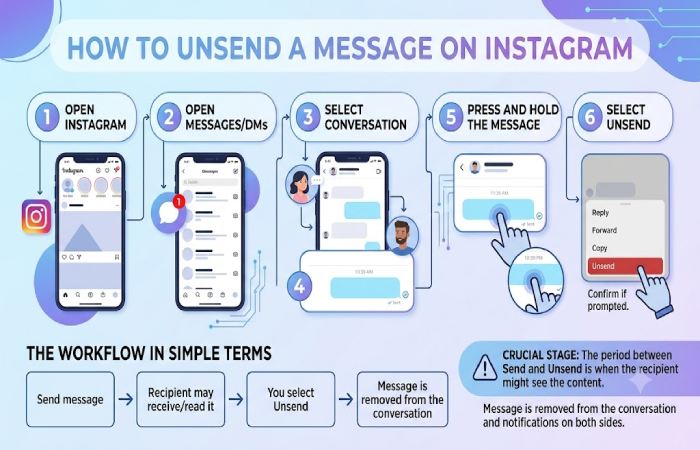
The process is straightforward:
- Open Instagram.
- Open Messages/DMs.
- Select the relevant conversation.
- Find the message you sent.
- Press and hold the message on the mobile app.
- Select Unsend.
- Confirm the action if Instagram asks you to.
On Instagram’s computer interface, the Help Centre describes selecting the conversation, going to the relevant message, opening its options and choosing Unsend.
The workflow in simple terms
Send message → Recipient may receive/read it → You select Unsend → Message is removed from the conversation
The crucial stage is the period between Send and Unsend. That is when the recipient has the opportunity to see the content.
Can Someone See an Instagram Message Before You Unsend It?
Yes. This is the biggest limitation of the feature.
Imagine that you send someone:
“Meet me at 7.”
Within ten seconds you realize you sent the DM to the wrong person and unsend the message. The DM will disappear from the Instagram conversation, but the recipient may have:
- Opened the DM.
- Read the message.
- Seen an Instagram notification preview.
- Been looking at the conversation when you removed it.
- Remembered the content.
Instagram’s own guidance makes this point clearly: people receiving a message may already have seen it before it is unsent.
Does Unsend Remove the Message From Both Sides?
Yes, in the normal Instagram chat experience, the unsent message is no longer visible to the people included in that chat. This is one of the key differences between Unsend and deleting a conversation only from your own inbox.
There is nevertheless an important expectation to set.
Removing the message is not the same as reversing the recipient’s experience.
If someone read the message before you unsent it, the information has already reached them.
What About Notification Previews?
This is where the answer becomes less absolute.
When you send an Instagram DM, they may receive a notification to their device based on their own settings. If they can view the preview before you unsend, you cannot ensure they have not seen what is in the DM.
Recent user reports also suggest that Instagram’s handling of unsent-message notifications may not be perfectly consistent across every account or app version.
Therefore, avoid relying on a rule such as “I unsent it immediately, so they definitely didn’t see it.”
A more realistic expectation is:
Unsend reduces the message’s availability in the chat, but it does not guarantee invisibility.
Does Instagram Notify If You Unsend a Message After It Is Read?
Usually, there is no separate “this person unsent a message” alert.
But if the recipient has already read the original message, there is no practical way to make them forget it. Unsend removes the message from the conversation rather than removing information from someone’s memory.
For example:
You send → They read → You unsend
The chat no longer contains the message, but the recipient has already seen its contents.
That is why timing matters more than the mere act of unsending.
Is Unsend Available on All Instagram Messages?
Instagram’s Help Centre describes Unsend for messages you have sent in a chat. It also notes an important data-related exception: if the chat or a surrounding message has been reported, unsent messages could potentially be included in the report.
That is another reason not to interpret Unsend as an absolute guarantee that a message has vanished from every possible system or context.
Pros and Limitations of Instagram Unsend
| Advantages | Limitations |
|---|---|
| Removes your message from the chat | Cannot undo someone already reading it |
| Useful for accidental DMs | Notification previews may expose content |
| Works for correcting mistakes | Behaviour can vary with app/account conditions |
| Removes the message from participants’ chat view | Does not erase screenshots or memory |
| Officially supported by Instagram | Reported chats may have different data handling |
Who Should Use Instagram Unsend?
Unsend is particularly useful when:
- You sent a message to the wrong person.
- You spotted a serious typo.
- You accidentally shared something in the wrong conversation.
- You changed your mind about sending a message.
- You want to remove outdated information from a chat.
It is less useful if your objective is to guarantee that nobody has seen the message. Once a DM has been delivered and viewed, Unsend cannot reverse that experience.
A Practical Example
Suppose you send a private message at 10:00 am.
- At 10:01 am, the recipient sees the notification.
- At 10:03 am, they open Instagram.
- At 10:05 am, you unsend the message.
The message can disappear from the chat at 10:05 am, but the recipient has already had two opportunities to see it.
Now consider a different situation:
10:00:00 — Send
10:00:01 — Unsend
There is less time for the recipient to open the conversation, but you still should not interpret that as a guarantee that the message was unseen.
Frequently Asked Questions
If you unsend a message on Instagram does it notify?
Generally, no. Instagram does not document a standard dedicated notification that tells someone you unsent a message. However, recent user reports indicate that some users may experience unusual notification behaviour, so it is safer not to treat the absence of an alert as an absolute guarantee.
Does the other person know if you unsend an Instagram message?
They may know if they saw the message before you removed it, saw a notification preview or happened to have the conversation open when the message disappeared. Otherwise, there is generally no dedicated unsend alert in the chat.
Can you unsend an Instagram message after someone has read it?
Yes. Instagram allows you to unsend a message you sent even if the recipient has already seen it. The important limitation is that removing the message does not erase what they already read.
Does Instagram leave a “message deleted” notification?
Instagram’s documented Unsend behaviour says the message will no longer be visible to people included in the chat. It does not describe a standard permanent “message deleted” placeholder.
Is an unsent Instagram message included in Data Download?
Instagram says that your Data Download file does not include messages you have unsent. However, Instagram also notes that unsent messages could be included if the chat or a surrounding message is reported.
Final Verdict: If You Unsend a Message on Instagram does It Notify?
So, if you unsend a message on Instagram does it notify the other person? The practical answer is usually no dedicated notification is sent, and Instagram removes the message from the chat.
But don’t confuse “removed from the chat” with “never seen”. A recipient may have already read the message, viewed its notification preview or been inside the conversation before you unsent it. Recent reports also suggest notification behaviour may not be identical for every user or app version.
Bottom line: Unsend is a useful way to remove an Instagram DM, but it is not a guaranteed way to make an already-delivered message completely unseen.